
How headhunters use CV databases to find you

Headhunters mine structured CV fields, tags, and AI matches to locate and rank candidates within hours, not days. Nearly 44% of sourced hires are candidates already known to the organisation, rediscovered through an internal ATS or talent database. That single figure explains why keeping your CV records current and correctly formatted matters far more than most jobseekers realise. What follows covers exactly how recruiters search, which CV fields they query, where well-written CVs still go unseen, and a practical checklist you can run today.
Table of Contents
- How headhunters actually source candidates
- Which CV fields do recruiters actually search on?
- How do recruiters actually search CV databases?
- Why well-written CVs still go unseen
- Step-by-step checklist to make your CV findable
- How SparkCV helps you get found
- Key takeaways
- SparkCV: findable CVs, faster
- Useful sources
How headhunters actually source candidates
Recruiters follow a strict, tiered sourcing hierarchy under deadline pressure. Understanding the sequence tells you where to focus your energy first.
- Internal ATS or talent database. The first 24 hours of any search go here. Recruiters look for “silver-medalists”: candidates who interviewed well previously but were not hired. Silver-medalists convert to hires 2–3 times faster than cold candidates, so this pool gets priority every time.
- External job boards. If three qualified matches cannot be found internally, the search escalates to platforms such as LinkedIn, Indeed, CV-Library, Reed, and Totaljobs. Each holds millions of UK CVs from candidates who may not be active on LinkedIn or respond to InMail.
- Outbound sourcing. Boolean X-ray searches on Google, GitHub, and specialist forums come last, reserved for niche or senior roles where the database and job boards come up short.
The practical consequence for you: if your CV record is stale, incomplete, or badly parsed, you are invisible at step one and harder to find at step two. Make your most recent job title, location, and top three skills unambiguous at a glance, because recruiters decide relevance in roughly 10 seconds.
Pro Tip: Register on at least two of the major UK job board databases (CV-Library, Reed, Totaljobs) with a freshly updated CV. Recruiters running saved searches on those platforms will see your profile the moment it matches their criteria.

Which CV fields do recruiters actually search on?
A reliable searchable candidate database separates two types of data: parsed fields for keyword queries and tags for human judgements. Both matter.
Primary parsed fields recruiters filter on:
- Current or most recent job title (the single highest-priority sort criterion)
- Employer name, sector, and approximate company size
- Location and postcode area
- Seniority level and years of experience
- Employment dates (gaps and recency both affect ranking)
- Skills and certifications listed as discrete tokens
Tags recruiters add manually:
- Silver-medalist, do-not-rehire, open-to-contract, open-now, relocating-2026
Skills need to use canonical names. Write “Python”, not “py” or “python3”. Write “Project Management”, not “PM skills”. Inconsistent naming means the parser files your skill under the wrong taxonomy bucket, and your record never surfaces in a filtered search.
Scope indicators matter too. Team size, direct reports, and revenue or budget responsibility are the evidence recruiters use to verify seniority. A title of “Senior Manager” means little without “managed a team of 12” or “P&L responsibility of £4m” somewhere in the same role entry.
Pro Tip: Use the exact job title taxonomy common in your sector. If the market calls the role “Data Engineer”, do not write “Data Wrangler” or “Analytics Developer” on your CV, even if those were your internal titles. Add the canonical title in brackets if needed.
How do recruiters actually search CV databases?
Search works in three layers, and your CV needs to survive all three.
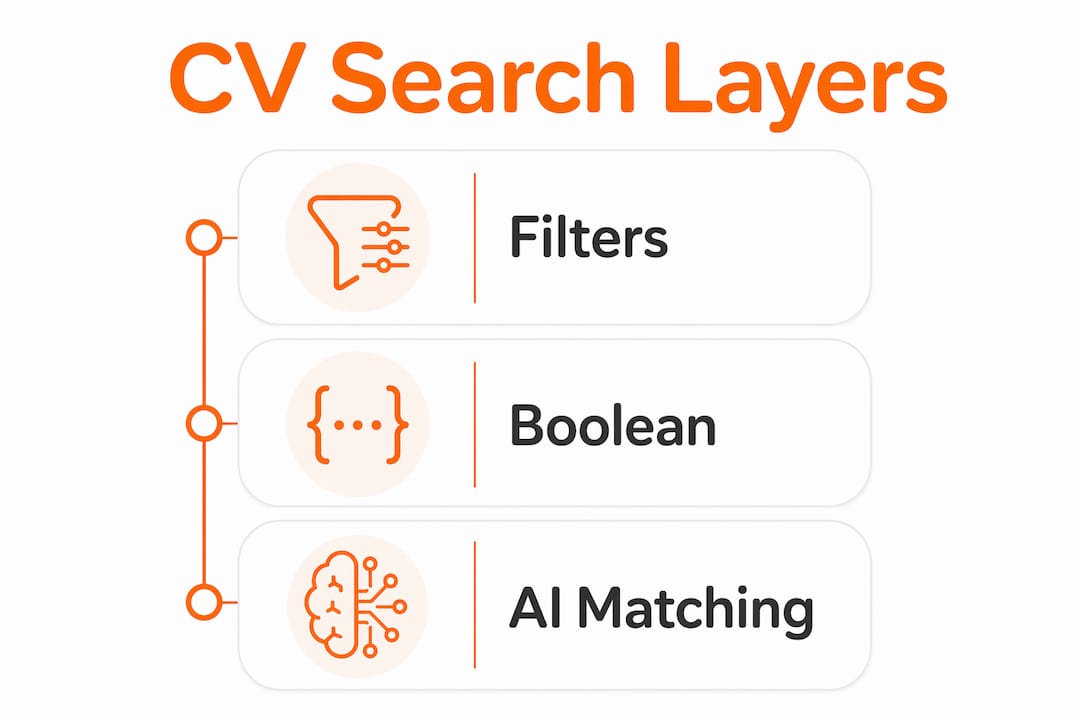
| Search layer | What it queries | Field types used |
|---|---|---|
| Filters and tags | Structured fields only | Location, title, seniority, availability tags |
| Boolean / keyword | Free text and titles | Skills section, role descriptions, certifications |
| Semantic / AI matching | Parsed text and embeddings | Full role context, synonyms, adjacent skills |
AI resume parsers convert your PDF or DOCX into structured fields: name, titles, dates, skills, team size. Parser accuracy is the single highest-leverage factor in whether you appear in filtered results. A parser running at 95% accuracy versus 80% produces a materially different candidate shortlist.
Boolean queries are still the workhorse. A recruiter searching for a React developer might run "React" OR "ReactJS" AND "TypeScript" AND London. If your CV says “React.js” in one place and “ReactJS” in another, a well-configured search will catch both. But if you have only written “front-end development” with no framework names, you will not appear at all. Semantic search helps here: modern platforms understand that React.js and ReactJS are the same thing, and that Vue.js experience is relevant to a React role. However, semantic matching still depends on clean parsed data as its foundation.
The critical failure mode is what practitioners call “confident nonsense”: poorly parsed or inconsistently labelled data causes AI matching to return high-confidence results for the wrong candidates. Garbage in, garbage out applies directly to your CV formatting choices.
Understanding AI candidate screening pitfalls helps you format your CV to avoid the most common parsing errors before they cost you an opportunity.
Why well-written CVs still go unseen
Your CV can read beautifully to a human and still be invisible in a database. These are the most common reasons.
- Complex layouts. Tables, multi-column formats, text boxes, and embedded images break most parsers. The parser cannot extract your job title from a styled header cell.
- Non-standard section headings. “Career highlights” or “My story” will not be recognised as a work experience section. Use “Work Experience”, “Skills”, and “Education”.
- Creative job titles. “Growth Ninja” or “Customer Champion” will not match any title-based filter. The recruiter searching for “Account Manager” will never see you.
- Stale location or availability fields. If your last uploaded CV lists a city you left two years ago, you will be excluded from every location filter for your current area.
- Unsupported keywords. Recruiters distrust keyword claims that appear without role context. Listing “stakeholder management” with no evidence of who the stakeholders were or what the outcome was reads as padding.
Pro Tip: Run your CV through a free ATS checker or paste it into a plain text editor. If the output is garbled or sections are out of order, a recruiter’s parser will produce the same result. Fix the formatting before you upload anywhere.
Understanding why CVs get rejected before being read gives you a clearer picture of the formatting and content errors that eliminate candidates at the database stage.
Step-by-step checklist to make your CV findable
Work through these steps in order. Each one directly addresses a recruiter search layer.
- Create a plain, single-column version. Standard headings and simple formatting are the foundation. No tables, no graphics, no text boxes.
- Normalise your job titles. Replace internal or creative titles with the canonical market equivalent. Add scope in brackets: “Senior Product Manager (team of 8, SaaS, Series B)”.
- Extract and list canonical skills. Add a dedicated Skills section with comma-separated tokens. Use the exact names the market uses: “SQL”, “Agile”, “Salesforce”, not abbreviations or synonyms.
- Surface measurable outcomes. For each role, include at least one quantified result tied to scope: revenue, team size, cost saving, or delivery timeline.
- Add an availability line. One sentence at the top: “Available from [date]. Open to permanent and contract roles in [location/remote].” This feeds the availability tag recruiters apply manually.
- Save role-specific tailored versions as separate files. A tailored CV for each target role outperforms a single universal document every time.
Test your CV like a recruiter would. Paste your CV text into a Boolean search simulator or run the string "[your job title]" AND "[your top skill]" AND "[your city]" against your own text. If the tokens do not appear exactly as you typed them in the search, the parser has not extracted them correctly. Iterate until they match.
GDPR and consent. Under UK GDPR, any service storing your CV must have your explicit consent and a clear retention policy. When uploading to job boards or third-party databases, check the data retention terms. Keep a note of where your CV is stored and review it quarterly.
Quarterly verification routine. Update your location, availability, and most recent title every three months. Save a plain text dump of your parsed CV output so you can compare versions and catch any regression.
How SparkCV helps you get found
SparkCV maps directly to the checklist above. Its extraction technology analyses your existing CV and a target job description, then produces a tailored, ATS-friendly version in minutes. Key capabilities:
- ATS-friendly formatting by default. Single-column, standard headings, clean text output that parsers read accurately.
- Keyword and title normalisation. SparkCV identifies the canonical skill names and job titles from the job description and aligns your CV language to match.
- Role-specific versions at speed. Generate a separate, targeted CV for each application rather than editing a single document repeatedly.
- Parsed output you can inspect. Review the extracted fields before you submit, so you know exactly what a recruiter’s ATS will see.
SparkCV is built for UK jobseekers and handles CV data with GDPR-aware practices. It is particularly useful for the application questions that many UK employers now require alongside a CV upload, generating tailored answers from the same job description analysis.
Key takeaways
Headhunters use CV databases by querying structured fields, tags, and AI matches in a tiered sequence, with internal databases searched first. Your CV’s discoverability depends on parsing accuracy, canonical titles, and current structured fields, not on how well it reads to a human.
| Point | Details |
|---|---|
| Internal databases come first | Recruiters check their ATS within 24 hours; keep your records updated on every platform where you have uploaded a CV. |
| Canonical titles and skills win filters | Use the exact job title and skill names the market uses; creative alternatives will not surface in title-based searches. |
| Formatting determines parse accuracy | Single-column, standard-heading CVs parse correctly; complex layouts break extraction and hide your record from filtered results. |
| Test before you upload | Run a Boolean string against your CV text to confirm your key tokens appear exactly as a recruiter would search for them. |
| SparkCV accelerates the process | SparkCV generates ATS-friendly, keyword-normalised, role-specific CVs quickly, reducing the manual effort of the checklist above. |
SparkCV: findable CVs, faster
Most jobseekers spend hours rewriting a single CV. SparkCV takes a different approach: it extracts the right signals from your existing CV, aligns them to the job description, and produces a clean, parseable version that headhunters’ databases will actually surface. You get canonical titles, structured skills, and ATS-friendly formatting without starting from scratch each time.
The practical next step is straightforward. Upload your current CV to SparkCV, paste in a target job description, and generate a tailored version for one role. Check the parsed output, confirm your job title and top skills appear exactly as a recruiter would search for them, and you are ready to upload to CV-Library, Reed, Totaljobs, or your target employer’s ATS with confidence.
Useful sources
- Candidate database: the signal layer recruiters mine first (Metaview) — source for the 44% rediscovery statistic, the 24-hour internal-match rule, silver-medalist conversion rates, and the “confident nonsense” data-quality warning.
- Searchable candidate database: tags, filters and smart search (Hirium) — explains how parsed fields and manual tags work together, and why canonical title mapping is the highest-leverage discipline.
- The benefits and best practices of using resume databases (Indeed) — practical recruiter guidance on Boolean search strings, keyword targeting, and location filtering.
- Searching CV databases like Totaljobs, Reed and CV-Library (Wave) — explains why UK job board databases remain integral alongside LinkedIn and what candidates on those platforms look like to recruiters.
- On assignment: inside recruitment databases (Database Trends and Applications) — covers the 10-second relevance decision and why standardised titles are the primary sorting criterion.
- Candidate database for recruiters: build one fast (StrategyBrain) — best-practice guidance on plain formatting and discrete scope fields that support accurate parsing.
- AI candidate screening: methods, pitfalls, and best practices (Testask) — analysis of how structured CV data affects AI screening accuracy; useful when testing your own parsed output.
Recommended reads
Keep exploring






Hear more from SparkCV
Leave your email for new articles, onboarding invites, and launch news.
We’ll only use this for SparkCV emails, and you can unsubscribe any time.